Computers and Shopping Lists:
Note: This was stolen from vexide, you can see the original here.
CPUs are great at doing exactly as they’re told — their sole purpose is to execute a list of sequential instructions. To illustrate this, we’ll use the analogy of a shopping list.
Let’s say you’re at the store and need to grab a few things from some different aisles.
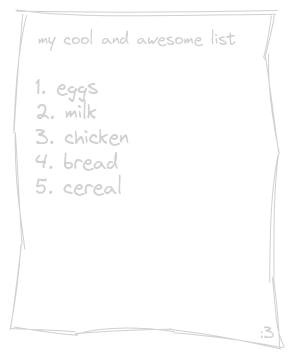
When finding these items, you can’t be in two different aisles at once, so you seek out each item on the list individually. CPUs largely work in the same way. On a system with one logical core you can only execute one instruction at a time.
When we run one function after another like this, we are executing them synchronously, where each function blocks the next from running until it has finished executing.

Scheduling and Concurrency:
Believe it or not, single-core systems can still run code concurrently! In fact, the V5 Brain runs all of your code on a single CPU core. Let’s look into how that’s possible.
Going back to the shopping list — you’re at the bakery and the man at the counter tells you to come back in 20 minutes to pick up your order. Rather than simply waiting at the bakery for 20 minutes, it’d be far more efficient to go do something else while your bread is being made. Applying this analogy, you are now doing two things concurrently - waiting for your bread and continuing your shopping list.
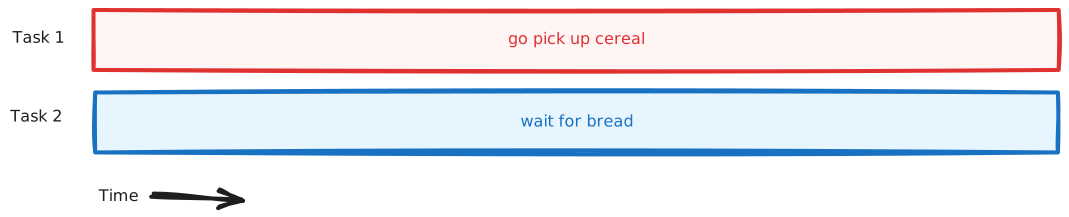
Computers can do this too. They often need to perform long-running operations that involve some kind of waiting. For example, when you download a file, you’re just waiting on data from the server and still want to be able to do other things like listen to music in the background or run your 37 chrome tabs.
Well, what if we had the ability to yield the execution of a function while it waits for something to happen and go do something else?

With asynchronous code, we can split the job of function execution into tiny pieces and overlap running these pieces on top of each other, giving the appearance of two things actually happening in parallel. We are still only executing one instruction at a time, but we rapidly switch contexts between different tasks allowing them to be run concurrently.
CPUs are very fast, so this approach ends up looking like we’re doing two things exactly at the same time, while also allowing us to efficiently wait for stuff to happen while still running other tasks in the background.
PROS Task:
PROS supplies FreeRTOS which manages threading on the brain. For implementation details on pros::Task visit (3.8.0 API or 4.0 API). Example:
pros::Task TaskA( []() { std::size_t i = 0; // Initialize Count Variable on thread start while (true) // Start infinite loop (will keep task alive) { i++; // Increment count variable by 1 std::cout << "index: " << i << '\n'; // Print current value of count // This delay will allow other tasks to run. Without this delay // this task would use the CPU indefinitely. pros::delay(500); // Delay for 500 milliseconds. } }, "Task A Thread"); pros::Task TaskB( []() { std::size_t i = 0; while (true) { std::cout << "index: " << i << '\n'; // Print current value of count pros::delay(1000); // Same as above but delays for 1 Second } }, "Task B Thread");** Example Output: **
// Time = 0index: 1 // Task Aindex: 1 // Task B// Time = 0.5 index = 2 // Task A// Time = 1.0index = 3 // Task Aindex = 2 // Task BNote: You can also use callbacks instead of lambdas. Lambda video is referenced here.
*Note: Due to the user code executing on a single thread, your code will not run in parallel but it can still provide significant benefits to multi-thread.